Hiddenvirus
Blessed are the Geeks, for they shall internet the earth
Crouching Hacker, Hidden Virus
Virus Alert
Douglas Chick
 I think the most frustrating viruses are the ones that you know you have and
you can't remove them. What is even more disturbing is when you have a virus
that no one has ever heard of. This is the case with a virus that I found
and call sqlcl.exe.
I think the most frustrating viruses are the ones that you know you have and
you can't remove them. What is even more disturbing is when you have a virus
that no one has ever heard of. This is the case with a virus that I found
and call sqlcl.exe.
On an early Monday morning two weeks ago, upon writing this, I said at my desk and stared almost mesmerized, as I do every morning, into my network monitor and watching the port numbers as if I were trying to read the "Matrix". On this morning there was; 1433 and port 25. My immediate thought was virus. I don't like that to be my first thought as I always accuse my friend Joe of blaming everything on a virus, but seeing these two port numbers this busy was all the evidence that I needed. As you should already know, 1433 is the port that MSSQL uses and 25 is Simple Mail Transport Protocol. What's more a scan was being performed on every IP Address in the range of the server looking for another open port of 1433. My next thought was the program scan1000, a program favored by virus makers because of its size.
It so happens that the the first computer that I went to check was the infected system. I opened Windows Task Manager --> Processes, and immediately looked for the busiest process. It was a program named; sqlcl.exe. I right clicked on it to end the process, and received an "access denied" message. I then ran a Windows Search for the file; sqlcl.exe like I always do when looking for a bug and the search came up empty. I opened a command prompt window and typed in the search there as well, because sometimes a hidden file will turn up when searching from the DOS prompt. Nothing. It was a well-hidden file. I then ran a command that attribs all hidden files out into the open, and still I didn't find anything. But I knew it was called sqlcl.exe because it was running as a process at near 80 percent usage.
In my usual pattern of looking for virus where-abouts, I ran a search sqlcl.exe on google--nothing. Microsoft's Technet--nothing. Cert.org--nothing. The entire Internet--nothing. I found no sqlcl.exe in any search. I spent the next two days going through every folder on the server and still found nothing. Finally I had no choice but to e-mail Microsoft and ask them for help. I received an e-mail the next day while I was out of the office with two phone numbers to call. I forwarded the e-mail to a co-worker, David and asked him to call. He said after sometime on the phone with a very polite Indian gentleman, Microsoft didn't have anything listed and suggested that it might be a SQL problem.
Desperate, I reinstalled all the service packs, security packs and any other thing I could find. The next day sqlcl.exe was on another server. Just as I was about to give the two servers a digital blood transfusion, David came up and said, look at this.
He right clicked on System Volume Information --> Permissions, and added
administrator permissions to the System Volume Information folder. He then
opened it and found our nasty hidden virus, crouching in a folder named .tmp.
I was so excited that I gave him a quick one-armed hug and after an awkward
silence, we both returned to our desks.
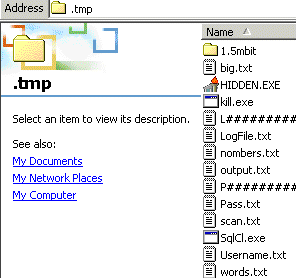 So, if you've reached this web page because it's the only link you found for
"sqlcl.exe", you're in luck. Just write click on System Volume
Information on all of your drives, add administrator permissions to the
folder and you will find it.
So, if you've reached this web page because it's the only link you found for
"sqlcl.exe", you're in luck. Just write click on System Volume
Information on all of your drives, add administrator permissions to the
folder and you will find it.
It's also a good idea to check all of your System Volume Information folders, because there may be more than a hidden virus inside.
Cheers, Douglas Chick